Discovering that you’ve paid too much money to the government is surprisingly common in the UK. Every year, millions of taxpayers inadvertently overpay their Income Tax through the Pay As You Earn (PAYE) system. This usually happens because of shifting circumstances—such as changing jobs, moving between different tax codes, or experiencing fluctuations in your monthly income. Fortunately, HMRC has a structured system to calculate these discrepancies and return your hard-earned money.
The mechanism behind this correction is known as a P800 tax calculation. If you are owed money, this calculation triggers a process that allows you to claim a P800 Refund. However, understanding how the system works, recognising official correspondence, and knowing the exact steps to secure your cash can feel overwhelming.
This comprehensive guide will walk you through everything you need to know about who qualifies for an HMRC P800 refund, how the calculation process operates, and how to safely claim your money without falling victim to modern financial scams.
What Is a P800 Refund?
A P800 tax calculation is an official statement sent by HMRC at the end of the tax year (which runs from April 6th to April 5th of the following year). This is only sent to people who pay their income tax via PAYE, which is mostly for people who are working or are on a private pension.
The P800 serves as a balancing statement. All of the information reported by your employers, pension providers, and financial institutions about your total earnings, tax deductions, and benefits for the financial year is pooled together by HMRC. If your employer has made deductions at a higher rate of tax than you were liable for, due to your personal allowance, your system will identify overpayment, and HMRC will send you this statement explaining how the overpayment occurred. It is the amount that is owed back to you that is called a P800 Refund.
It is extremely important to distinguish the regular tax notification from this calculation. The form details how much you earned vs. how much you should have paid, and it is the final yes/no that proves you deserve a rebate.
Who Qualifies for a P800 Refund?
Not everyone automatically receives a P800 Refund, as qualification depends entirely on your employment type and your tax records during the financial year. To qualify for this specific rebate, you must meet the following baseline criteria:
- You must pay tax via PAYE: This process is only available to those whose income tax is deducted from their pension or salary by an employer or pension administrator (PAYE).
- Your tax records must show an overpayment: You will need to have proof of overpayment on your tax records; this is compared with any personal allowance (£12,570 for the standard tax code).
- You must not be registered for Self Assessment: If you file an annual Self Assessment tax return as a sole trader, freelancer, or high earner, your tax balancing happens through your tax return submission rather than an automated P800 form.
If you are employed or pulling a pension and your circumstances changed unexpectedly mid-year, there is a very high probability that you qualify for an HMRC P800 refund.
Common Reasons You May Have Overpaid Tax
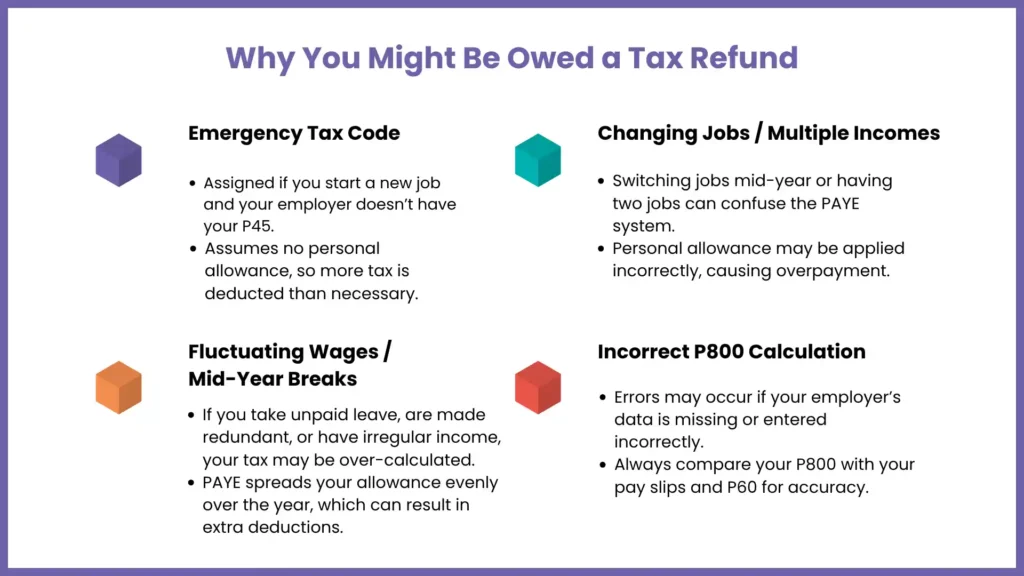
Once you know the reasons for an overpayment, you’ll be more aware of your pay slips. The PAYE system is very automated, and if there is any slight delay or mistake, it can be easy to end up with an HMRC tax code being overpaid. Let’s look at the most common triggers of an overpayment:
1. The Dreaded Emergency Tax Code
You may be assigned an emergency tax code if you have started a new job and your new employer fails to get a P45 from your old employer before the deadline or if it takes HMRC some time to issue the correct tax code. This is a temporary one, and it assumes that you have no personal allowance to tax the first £100,000 of your income. Once the year closes, an emergency tax code refund is usually generated via a P800 to return that heavily taxed income back to you.
2. Changing Jobs or Having Multiple Income Streams
If you switch jobs frequently throughout a single financial year, or if you hold down two jobs simultaneously, the PAYE system can get confused. Your personal allowance might be split incorrectly between employers, or both employers might accidentally apply the full allowance to your paychecks, leading to a major fluctuation. Once HMRC reconciles the records, it will identify the exact HMRC tax code overpayment and rectify it.
3. Fluctuating Wages or Mid-Year Breaks
The PAYE system allocates your Personal Allowance evenly over a 12-month period (or 52 weeks). If you are made redundant for a few months or take a break longer than a month during the year, then you will not have used your full tax-free allowance for those months. Consequently, when you return to work, you will likely have paid too much tax relative to your actual total annual income.
4. P800 Incorrect Calculation
HMRC’s systems are strong, but it’s possible for there to be errors when data is input or missing information from third parties can cause a P800 to result from an incorrect calculation. The P800 statement will show any final earnings reported incorrectly by the employer, for instance. Weighing all the numbers on your statement against your own record is always a good idea.
How to Claim Your P800 Refund (Step-by-Step Guide)
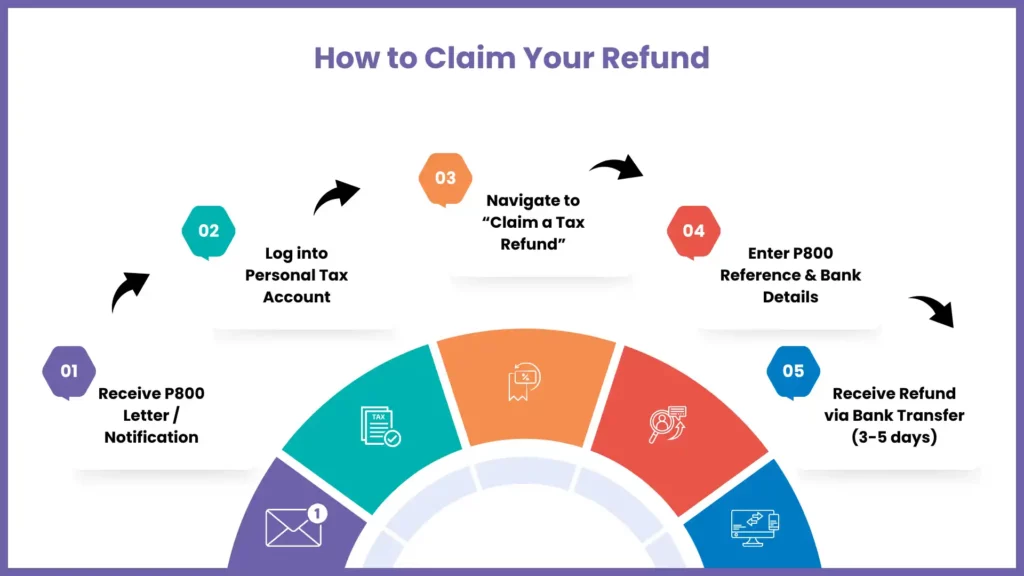
If you’re owed money, you’ll need to make your claim when HMRC has processed your records and confirmed. The easiest and most secure way to do this is to make an online P800 refund claim. Here’s a step-by-step guide on how to go about it:
Step 1: Secure Your Login Details
To complete your P800 refund claim online, you need to log in to your personal tax account via the official GOV.UK portal. You will need to have your government gateway user ID and password. You can create a new one if you don’t have one with your National Insurance number and a piece of identification, such as a passport or driving license, in a few minutes. Or you can download the official HMRC app for your smartphone.
Step 2: Access the Refund Portal
Once logged into your dashboard, check your messages or look for the section marked “Claim a Tax Refund” or “Check your income tax for previous years.” If your P800 calculation has been finalised, the system will explicitly state the exact amount you are owed.
Step 3: Provide Your Bank Details
Select the option for an HMRC bank transfer refund. You will be asked to input your UK bank account number and sort code. Ensure that the account name matches your legal name exactly to prevent security delays.
Step 4: Submit and Confirm
Review the details and submit your request. The system will provide a confirmation reference number. This electronic approach is highly secure and significantly faster than waiting for a paper check to arrive through the mail.
HMRC Tax Refund Letter – What to Look For
While digital notifications are becoming the standard, millions of taxpayers still receive an official physical HMRC tax refund letter in the post. Knowing how to read this document is essential for validating its legitimacy and understanding your next steps.
Once you’ve opened the mail, you should look for the special P800 reference number. It is normally located at the top right-hand corner of the page and is composed in a certain alphanumeric code. If you opt for claiming online, or you want to phone HMRC to check the numbers, you will need this reference number.
The letter will clearly include a comparison of how much money you earn through your job or pension and what taxable benefits you received (such as a company car or health insurance) and the actual amount of tax deducted. A breakdown of the calculation will show up at the bottom and show if you are ‘in credit’ (you are entitled to a refund, meaning you are owed a refund), or if you have underpaid. If it states you are owed a refund, the letter will explicitly guide you on whether you can claim online or if a check is already on its way to your registered address.
How Long Does a P800 Refund Take?
The timeline for receiving your money depends heavily on the method you use to claim it.
- Online Claims (Bank Transfer): Online claims are extremely quick if you choose to claim a refund via HMRC’s Personal Tax Account or HMRC app using a bank transfer. This is generally paid into your preferred UK bank account within 3-5 working days of submitting your request.
- Postal Claims (Cheque): If you do not make a claim online, or if you are told online that you cannot claim digitally, a cheque (or payable order) will be sent to you by post to your home address. This takes longer, usually within 14-21 days of the P800 letter being printed.
Be aware, it can take a little longer to process during busy periods, for example, the first few months after the end of the tax year (June to September) when HMRC are busy dealing with a large number of calculations.
What to Do If You Haven’t Received Your P800 Refund
If you are told that you are entitled to a refund and the funds do not arrive in your bank account, and/or you don’t get your cheque within the time frame expected, don’t get upset. There are steps and guidelines that can be utilised to track back your funds.
To check on the status of the payout, log in to your personal tax account first. The portal will display “pending,” “approved,” or “paid” for the claim. If the refund amount is credited even though the bank account has no funds, then be sure that you didn’t type in the wrong account number when submitting the transaction.
If the online portal is not clear, you will need to get in touch with HMRC. The agent will ask for your P800 reference number to access your secure profile, so have this ready and on hand before picking up the phone, plus your National Insurance number and your physical tax refund letter from HMRC. Expect to have to wait a long time on the phones, especially midday.
Can You Get a Tax Refund Without a P800?
Yes, it is possible to get a tax rebate without receiving a calculation letter from the P800. You can make a claim for an HMRC tax code overpayment if you are certain that you have overpaid tax in the middle of the year, such as when you were let go from your job but never reported to HMRC.
To do this without a P800, you can fill out an online form known as a P50 via the GOV.UK website. This form is specifically designed for individuals who have stopped working and want to claim back overpaid tax before the financial year formally concludes. Or, if you feel that the tax code you have is basically incorrect and you are ending up paying more in taxes from month to month, you can go on-line and use the “Check your Income Tax” service to change some of your estimated income information. Your submission will then be reviewed by HMRC, who will adjust your tax code dynamically and your overpaid tax from any months previously will be refunded back to you automatically by your employer in your next paycheck.
Avoiding P800 Refund Scams
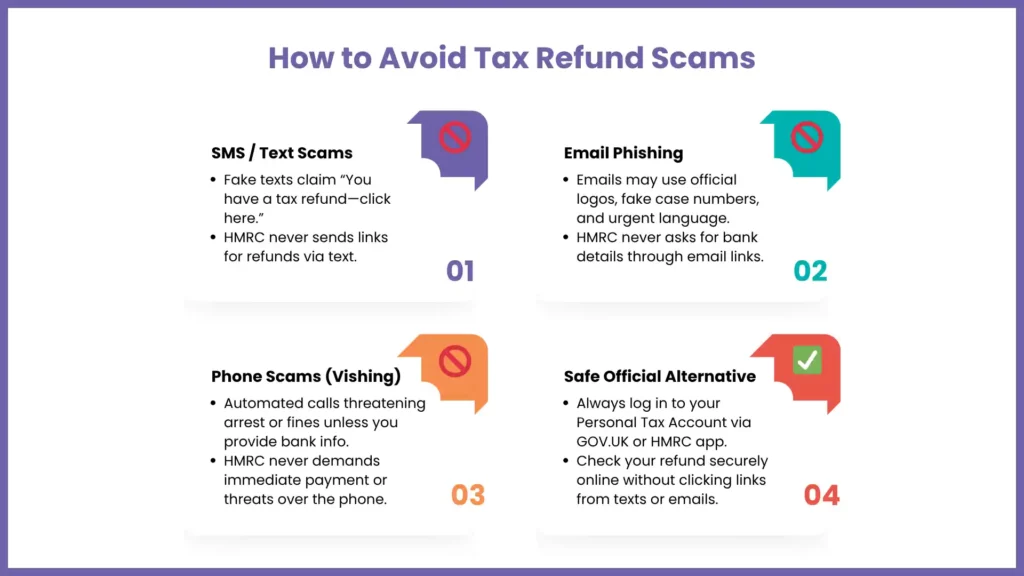
With their popularity, the P800 Refund is a perfect choice for advanced cybercriminals or fraudsters. Phishing emails, text messages, and automated phone calls are often sent by scammers appearing to be from official HMRC letters.
| Scam Communication Channel | Common Fraudulent Tactics | Safe Official Alternative |
| SMS / Text Messages | Contains text like “You have an outstanding tax rebate click here to claim” leading to fake landing pages. | HMRC will never send a text containing a direct link to claim money. |
| Email Phishing | Uses official branding, fake case numbers, and urgent language demanding immediate bank entry. | HMRC emails will never ask for personal or financial details directly via a link. |
| Phone Calls (Vishing) | Automated robotic voices threatening legal action or arrest unless bank details are verified. | HMRC will never threaten immediate arrest or demand urgent payment over a phone call. |
There is one golden rule that can help you stay safe from an HMRC scam: HMRC will never text or email you a direct link to ask for tax refunds. Any e-mail that tells you to click a link and then enter your credit card or bank information and then expect to receive money is a scam. Remember to close the message, open a new browser window and go straight to GOV.UK, and then log in to your Personal Tax Account securely to check for notifications.
How to Prevent Overpaying Tax in the Future
While getting an unexpected lump sum back from the government feels great, overpaying tax essentially means you have given the state an interest-free loan of your hard-earned money. You can minimise the risk of future overpayments by taking a few proactive steps:
- Monitor Your Tax Code: Check your monthly pay slips closely. The standard tax code for most UK workers is 1257L. If you see a different code, or if you spot an “X”, “M1”, or “W1” at the end of it, you are on an emergency track.
- Promptly Inform HMRC of Changes: If you take on a secondary job, receive a company car promotion, or start drawing an extra pension, notify HMRC through your online portal immediately rather than letting them discover it at the end of the year.
- Understand P800 vs P60: At the end of every tax year, your employer is legally required to hand you a P60 form. This document exactly how much you earned and how much tax was deducted. Comparing your P800 vs P60 is the ultimate way to verify accuracy. If the earnings figure on your P800 doesn’t match the exact total printed on your P60, you have identified a mistake that needs immediate correction.
When Do HMRC Send Out P800 Refunds?
HMRC processes tax calculations systematically after the close of the financial year on April 5th. Generally, P800 letters and notifications start rolling out in batches from June and continue through to the end of November.
The exact timing of when you receive yours depends heavily on when your employer or pension provider submits their final payroll data reconciliation to HMRC. If you have multiple jobs or a highly complex employment history during the year, your account may take longer to review, meaning your calculation might arrive closer to late autumn. You can track when your specific calculation is expected by checking the progress timelines within the official HMRC app.
FAQs: Frequently Asked Questions
Will I automatically receive my P800 refund, or do I need to claim it?
The calculation happens automatically, but how you get your money depends on the system’s instructions. If your P800 letter states you can claim online, you must log into your personal tax account to initiate the bank transfer. If you do not claim online within 21 days of the letter date, HMRC will automatically default to printing and posting a paper cheque to your address.
What if I disagree with my P800 tax calculation?
If you find any discrepancy or feel that there is a calculation error in the P800, don’t accept the refund or ignore the notice. Collect all your pay slips and P60s for that year, and contact the HMRC PAYE helpline right away if you have any P45s. Make an explanation of the differences so they can update their records and provide an amended calculation.
Can self-employed individuals receive a P800 refund?
No. The P800 mechanism is built exclusively for individuals taxed under the PAYE framework. If you are self-employed, your overpaid tax is calculated and credited directly through your annual Self Assessment tax return process instead.
When do HMRC send out P800 refund letters?
HMRC mails out these specific notices between the months of June and November each year, processing them in staggered stages as employer data is officially verified.
Can I claim a P800 refund without the letter?
Yes. If you lose the physical letter but know you are due a rebate, you can bypass it completely by logging directly into your online Personal Tax Account or the HMRC smartphone app, where the digital equivalent and your refund portal will be fully accessible.
What happens if my P800 shows I owe tax instead of getting a refund?
In some cases, a P800 calculation may result in an underpayment instead of an overpayment. If you have any money owed, HMRC will try to collect this tax automatically in the next tax year by making the necessary adjustments to your tax code, unless your income is too low to generate this tax through PAYE.
Is there a deadline to claim a P800 refund?
Yes. You have 4 years from the end of the tax year to claim any over-paid income tax, from the time of the event.From the time of event, you have 4 years from the end of the tax year to make claims for over-paid income tax. If this four-year statutory time limit is not adhered to, the money goes to the Crown.
Should you use an accountant to claim a P800 refund?
For a standard P800 tax refund, using a commercial claims company or an accountant is usually completely unnecessary. These third parties have fees that they charge based on percentages, and they will take a lot of paperwork. It only takes less than ten minutes to claim online using GOV.UK and it is entirely free, so it saves you having to pay 100% of your money when you could claim it yourself.
Conclusion
Sometimes, tax laws in the United Kingdom can be daunting, but one of the easiest financial processes that ordinary taxpayers can undertake is getting their P800 Refund. The refund is yours, not the tax office, regardless of whether you overpaid due to a temporary emergency tax code or an involved mid-year career shift.
If you’re able to remain vigilant and closely monitor your monthly pay slips, compare your P800 vs P60, and take advantage of the appropriate channels to submit a P800 refund claim online, you can be certain you’ll receive your cash on time and safely. Be very wary of unsolicited emails or texts of refunds and only use secure websites such as GOV.UK to claim what you are entitled to – don’t delay!