When we handle our banking, grocery, and social needs via digital platforms, it also makes sense to deal with the tax office digitally, too. For years, dealing with HM Revenue & Customs (HMRC) has been one phone call after another or a maze of paper-based forms to fill in that had to be sent by post. But this is a very different picture for UK taxpayers with the introduction of the Personal Tax Account.
Your Personal Tax Account is the digital space where all your tax information is stored in one safe and easy-to-access location for anyone paying tax via PAYE, a freelancer completing Self Assessment, or pensioners receiving state benefits and having to keep an eye on it. This guide will take you through the steps you need to take to set up and explain why this is an essential tool for today’s financial management.
What Is an HMRC Personal Tax Account?
Consider your HMRC Personal Tax Account an online “one-stop shop” for your own tax affairs. It is a safe online platform that enables you to access and control your tax data in real time as part of a government initiative called “Making Tax Digital.
The Personal Tax Account is not the same as a Self Assessment account, which is only for people who have to submit their tax returns every year, but it is available to every individual in the UK with a National Insurance number. It brings together information from different systems used by the government, such as income tax, National Insurance, and state pension records, and provides a picture of your finances with the government. It will remove the need to wait for your P60 or P45 to know your tax position because the data will be updated as HMRC receives it.
What Can You Do With a Personal Tax Account?
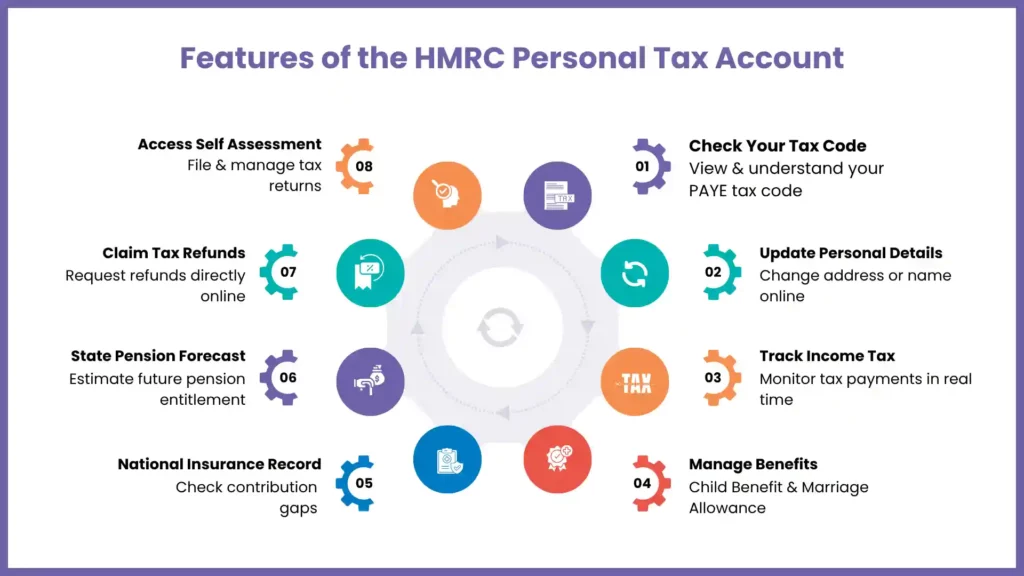
It’s the versatility of the portal that makes it its strongest attribute. After logging in with HMRC, you can do different things compared to calling HMRC or mailing a letter, including:
- Check Tax Code Online: View your current tax code and how it is applying to your taxable income from various sources instantaneously.
- Update Personal Details: Change your name or address once, and the system does it throughout all HMRC departments.
- Track Your Tax: See how much income tax you’ve paid this year, and make estimates of what’s left this year.
- Manage Benefits: Check and make changes to your Tax-Free Childcare, Child Benefit, and Marriage Allowance claims.
- National Insurance Record: Make sure there are no gaps in your National Insurance record that could impact your state pension.
- State Pension Forecast: Works out your real-time estimate of your State Pension entitlement and when you can claim it.
- Claim Tax Refunds: If you made overpayments via PAYE, the tax refunds can be claimed directly via the PFT portal instead of waiting for a cheque to be sent in the mail.
- Self Assessment: This is a wider tool, but you can also go to the Self Assessment filing & payment screens from here.
What You Need Before Setting Up Your Account
Security is paramount when dealing with financial data, so HMRC requires a rigorous verification process. Before you begin the Personal Tax Account setup, ensure you have the following items at hand:
- National Insurance Number: Mentioned on your payslip, P60, or NI card.
- Valid Email Address: This will be registered to your Government Gateway account.
- A Telephone Number: For getting security codes by text or phone (It is a Two-Factor Authentication).
- Identity Documents: For verifying your identity with HMRC, you will need at least two of the following documents:
- A valid UK Passport.
- A recent P60 or a recent payslip (from the last 3 months).
- A Northern Ireland driving license.
- Information from your credit file (such as the date you took out a mortgage or a mobile phone contract).
- Details of a Self Assessment tax return (if you have filed one recently).
How to Set Up Your HMRC Personal Tax Account
For setting up your account with HMRC, you need to follow two steps: register and create a Government Gateway (ID), then verify your personal identity with them.
Step 1: Create a Government Gateway User ID
For creating the Government Gateway. Visit the official GOV.UK website and click on ‘Sign in.’ If you don’t have an account, click “Create sign-in details.” You’ll be asked to provide your email address, and HMRC will check this by sending you a one-time code to the email address provided. Once verified, you will be able to create a password and receive a 12-digit Government Gateway account ID.
Record this as soon as you can, as you will need this for subsequent logins.
Step 2: Set Up Access Protection
HMRC will also require you to set up an additional layer of security. The majority of users opt for a code to be sent to their mobile phone. Every time you try to log on to your HMRC account, you will enter your 12-digit Government Gateway ID, your password and the new code sent to your phone.
Step 3: Identity Verification
This is where you prove you are who you say you are. You will enter your name, date of birth, and National Insurance number. The system will then ask you questions based on the identity documents mentioned above. For example, it might ask for the “tax deducted” figure from your latest P60 or the last four digits of the bank account linked to your mortgage.
Step 4: Access Your Account
Once the system matches your answers with the records held by HMRC and credit agencies, your account is live. You will be taken to your “Account Home” screen, where you can see tiles for Income Tax, National Insurance, and more.
Common Problems When Setting Up a Personal Tax Account
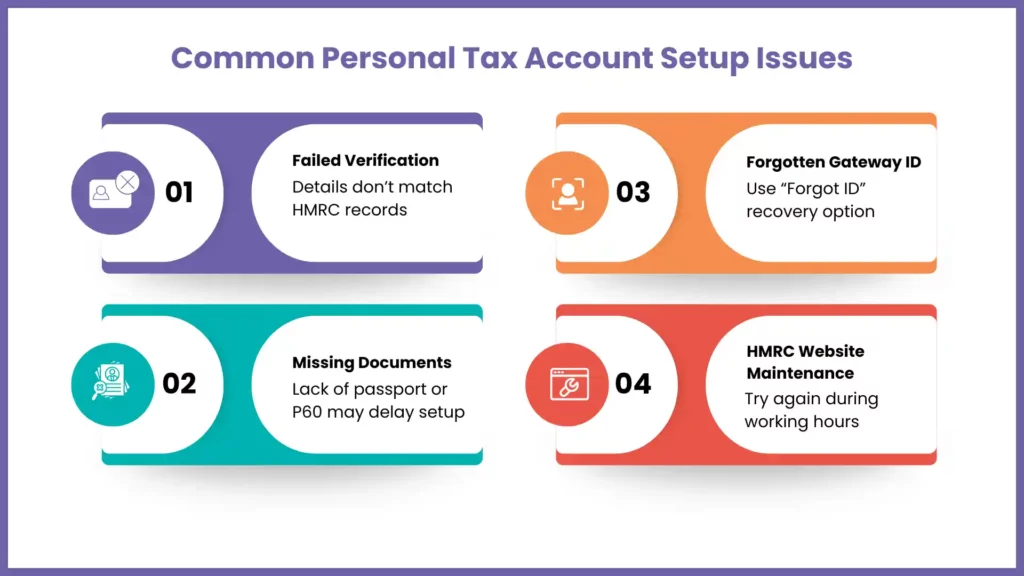
While the process of setting up a personal tax account is designed to be smooth, users often encounter a few hurdles:
- Failed Verification: Failed verification typically occurs when the details you enter do not exactly match the record’s HMRC information. For example, an outdated address or a different name format. If you fail three times, you may be locked out for 24 hours.
- Missing Identity Documents: If you do not have a passport or a recent P60, the system may have difficulty verifying you. In such instances, you can either use the “GOV.UK Verify” option (if available) or by calling the HMRC helpline.
- Lost Gateway ID: Many people create an account and forget the ID. Click on the “Forgot ID” link on the login page; HMRC can usually recover it via your registered email.
- Technical Glitches: The HMRC online account system sometimes undergoes maintenance, particularly on weekends. If the site is down, try again during standard business hours.
Can an Accountant Set Up a Personal Tax Account for You?
This is a common point of confusion. The answer is no. While an accountant can be your “Authorized Agent” to handle your Self Assessment or Corporation Tax, they cannot—and should not—set up or access your Personal Tax Account.
The Personal Tax Account is designed for the individual. Because the setup requires highly sensitive personal information (like passport details and credit file history) and uses two-factor authentication linked to your personal phone, it is a private portal. At MyIVA, we can guide you on how to use the information found in your account to help us manage your taxes, but the security credentials must remain yours alone.

Need Help With Your HMRC Taxes?
MyIVA can help you with Self Assessment, tax refunds, and HMRC queries—making tax management simple and stress-free.
FAQs: Frequently Asked Questions
Is the Personal Tax Account the same as a Self Assessment account?
No. The Personal Tax Account is a broader portal for all taxpayers. However, your Self Assessment details are accessible from within it. You use the same Government Gateway ID for both.
How long does it take to set up?
If you have all your documents ready in place, it hardly takes up upto 15-30 minutes for setting up the government account.
Can I access my Personal Tax Account via an app?
Yes, HMRC has an official “HMRC App” available on iOS and Android. Once you have set up your online account with them, the app will allow you quicker access by using Biometrics (Face ID or fingerprint).
Will I still get letters from HMRC?
You can choose to go paperless within the account settings. Once you opt for this method, HMRC will email you when there are any new messages. This will be sent to your secure online inbox rather than any physical letter.
Is it safe to use?
Yes. The HMRC online account uses the same level of security as major UK banks, including identity verification and two-factor authentication.
Conclusion
Taking the time to set up your HMRC Personal Tax Account is one of the smartest moves you can make for your financial health. It moves you from a position of passive waiting to active management. Being able to check your tax code online or spot gaps in your National Insurance record early can save you significant money and stress in the long run.
In a digital-first world, having instant access to your tax data is no longer a luxury—it’s a necessity. Follow the steps above to claim your digital identity with HMRC today, and take the first step toward a more transparent and manageable tax life. At MyIVA, we believe that an informed taxpayer is a confident taxpayer!