

Did you know that thousands of taxpayers in the UK overpay their tax every year and never claim their refund? It’s far more common than most people realise. Sole traders, small firm owners, freelancers and first-time filers often find themselves unsure about how much tax they should have paid and whether they’re due anything back. With HMRC’s online system, payments on account and various reliefs, it’s easy to see why so many people get confused.
If you’ve overpaid tax through Self-Assessment, the idea of claiming it back can feel overwhelming. You might not know where to start, what to check or how to make sure HMRC processes everything correctly. And when you’re already juggling the daily pressures of running a small firm or managing your income as a self-employed professional, dealing with tax can feel like yet another job in itself.
The reassuring news is that once you understand how to check your figures and submit a Self-Assessment Tax Refund properly, the whole process becomes simpler. You’ll be able to avoid delays, reduce mistakes and take control of what you’re owed. MyIVA supports many individuals every year with personal tax returns and refund claims, helping them handle HMRC confidently. This guide explains everything you need to know about claiming a Self-Assessment Tax Refund in 2026, in clear, easy-to-follow steps.
How to Know If You’ve Overpaid Income Tax
There are several situations where taxpayers end up paying more than they should, which later leads to a Self-Assessment Tax Refund. The most frequent reasons include:
Incorrect PAYE coding
A wrong tax code can mean you’re taxed at a higher rate than necessary. This is common when you start a new job or have multiple income sources.
Overestimated income
If you’re new to self-employment, you may have guessed your income too high, which also affects your payments on account.
Reliefs not claimed
Many people forget to include allowable expenses, pension contributions or trading costs. This makes their tax bill appear higher than it should be.
Duplicate payments
Sometimes taxpayers pay through PAYE and then make manual payments on top, or accidentally pay twice online.
Signs You Might Be Due a Refund
You may be owed a Self-Assessment Tax Refund if:
- Your HMRC calculation shows more tax paid than tax owed
- Your income dropped during the year
- You paid large payments on account that turned out unnecessary
- You forgot to include expenses or reliefs
- You changed jobs and your tax code was updated mid-year
These signs don’t confirm a refund, but they’re strong indicators that you should check your HMRC online account.
Difference Between PAYE and Self-Assessment Overpayments
Some people receive automatic PAYE refunds, often triggered by a P800 letter. This happens when HMRC spots mistakes without you needing to request anything.
However, PAYE refunds do not cover errors in Self-Assessment. If you overpaid through your Self-Assessment return, you must claim your Self-Assessment Tax Refund manually through your online account.
Check Whether You Are Owed a Refund (Before Claiming)
How to Check Your HMRC Online Account
Log in to your Government Gateway and access your Self-Assessment section. This is where you’ll see:
- Tax returns submitted
- Balancing payments
- Payments on account
- HMRC calculations
This area clearly shows whether you’re due a Self-Assessment Tax Refund.
Understanding Your SA302 and Tax Calculation
Your SA302 gives a full breakdown of:
- Income from all sources
- Tax due
- Tax already paid
- Adjustments from HMRC
If the total paid is higher than the amount due, you’re likely owed a Self-Assessment Tax Refund.
Comparing Tax Paid vs Tax Owed
To confirm your position, compare:
- PAYE deductions
- CIS deductions if you’re a contractor
- Payments on account
- Balancing payments
Step-by-Step Guide: How to Claim Your Self-Assessment Refund in 2026
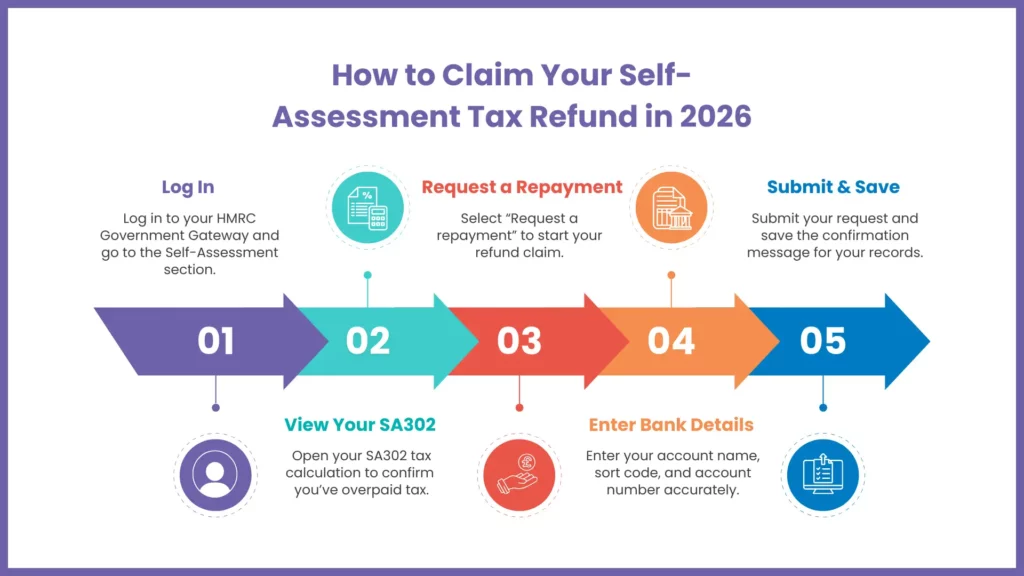
Step 1 – Log in to Your HMRC Government Gateway Account
Visit the HMRC login page and enter your details. If you’re a new filer, make sure you’ve completed ID checks.
Step 2 – View Your Tax Calculation
Open your Self-Assessment tax return and look for your SA302 summary. This will confirm whether you are due a Self-Assessment Tax Refund.
Step 3 – Select the Refund Option
If you’re owed money, you’ll see an option labelled Request a repayment. Select it to begin the process.
Step 4 – Enter Your Bank Details
HMRC usually prefers to pay refunds by bank transfer. Enter:
- Account name
- Sort code
- Account number
Make sure the details are correct to avoid delays.
Step 5 – Submit Your Refund Request
After submitting your request, HMRC will show a confirmation message. Save a copy in case you need to follow up. MyIVA often advises clients to screenshot this page for reference
What to Do If You Haven’t Heard Back from HMRC
How Long You Should Wait
Most Self-Assessment Tax Refund payments take between 3 and 21 days. They may take longer during busy periods such as January or April.
How to Track Your Refund Status
In your HMRC account, you can check whether:
- Your request was received
- HMRC is reviewing your details
- Your Self-Assessment Tax Refund has been issued
When and How to Contact HMRC
Contact HMRC if:
- Three weeks pass without progress
- Your status changes and you’re not sure why
- You need clarification about bank or security checks
Have your UTR, NI number and bank details ready. MyIVA often handles this communication for clients to save time.
What to Do If It’s Too Late to Amend Your Tax Return — Claiming Overpayment Relief
What Overpayment Relief Means
If the window for amending your self-assessment tax return has closed, you can still claim money back using overpayment relief. This applies if you made a genuine mistake that led to an incorrect tax bill.
Time Limits for Making a Claim
You usually have four years to claim overpayment relief. For example, for the 2021 to 2022 tax year, claims must be made by 5 April 2026.
How to Submit an Overpayment Relief Claim
Your written claim should include:
- UTR
- Tax year
- Corrected figures
- Evidence such as CIS statements or receipts
- A clear explanation
MyIVA helps clients gather documents and submit clear, accurate claims.
Self-Assessment Refund Timelines — What to Expect
Before you request your Self-Assessment tax refund, it helps to know how long HMRC usually takes to process payments. Timelines can vary depending on the method you choose and how busy HMRC is at that point in the year. The table below brings everything together so you can quickly see what to expect and what might slow things down.
| Category | Details |
| Typical processing time for online refunds (bank transfer) | 3 to 14 days |
| Processing time during busy tax seasons | Up to 3 weeks |
| Typical processing time for cheque refunds | 3 to 6 weeks |
| Factors that may delay your refund | Incorrect bank details HMRC security checks Missing information Differences between PAYE and Self-Assessment records Outstanding debts |
Refund Methods and Payment Options
While HMRC usually pays refunds via bank transfer for speed and security, some taxpayers may receive their refund by cheque if:
- They have not provided bank details with their Self-Assessment
- There are issues verifying bank information
- HMRC requires additional security checks
Cheque refunds can take longer, typically between 3 to 6 weeks to arrive. If you expect a cheque payment, ensure your postal address is up-to-date in your HMRC account to avoid delays.
Common Issues & How to Fix Them
Incorrect Bank Details
HMRC will pause your Self-Assessment Tax Refund if your bank details don’t match. Updating them online usually fixes this quickly.
HMRC Security Checks and Identity Verification
HMRC may request extra ID checks. Responding promptly prevents long delays.
Errors in Your Tax Return
If your return is flagged, HMRC may need clarification. MyIVA can review your figures and help correct errors.
Missing Documents or Evidence
If HMRC asks for receipts, CIS statements or other proof, send them as soon as possible.
FAQs: Frequently Asked Questions
How long does a Self-Assessment refund take?
Most refunds arrive within three weeks when paid directly into your bank account. It can take a bit longer during busy filing times, but most people get their money without any issues.
Can I get interest on my overpaid tax?
Yes, HMRC may add interest if you’ve paid more tax than necessary. This is done automatically, so you don’t need to ask for it separately.
What if HMRC rejects my refund request?
If this happens, it usually means something on your return needs correcting or clarifying. MyIVA can help you figure out the issue, make the necessary changes, and resubmit the request correctly.
Can an accountant claim my refund for me?
Yes, an accountant can handle the claim for you by accessing your Self-Assessment record. MyIVA can take care of the numbers, paperwork, and communication with HMRC to simplify the process for you.
Do I need to submit a new tax return to claim my refund?
Not always. If your original Self-Assessment is correct, you can claim the refund directly through your HMRC account. MyIVA can help you check everything before you submit the request.
Summary of Key Points
- You could be owed a Self-Assessment tax refund if you’ve accidentally overpaid tax.
- A quick check of your HMRC account, and taking a good hard look at your SA302, should give you a good idea if there’s a refund waiting for you.
Conclusion
Getting your claim in early will not only avoid delays, but it’ll also get HMRC to process your refund a whole lot faster. And the best part is, it’ll also save you from the chaos of the last-minute rush when loads of people are trying to get their claims in all at once.
Final Bit of Advice to Make Your Tax Refund Stress-Free
If you’re not 100% sure about your figures, or if you need a spot of help with the whole refund process, then we’re here for you at MyIVA. We’ll help guide you through it all from start to finish, or even take the reins and manage the whole thing for you if you’d like. Just give us a shout whenever you’re ready to get things sorted!