



Selling on Amazon looks simple from the outside, list a product, wait for orders, collect a payout. Anyone who’s actually run a store knows better. Behind every sale is a maze of referral fees, storage charges, refunds, and inventory shifts, and the only way to keep it straight is through solid Amazon bookkeeping. New sellers shipping their first box into FBA and established ones pulling seven figures a year hit the same wall eventually: without clean books, you’re just guessing at your own profit.
This guide is built for US sellers specifically. We’ll cover why Amazon bookkeeping matters more than most people expect, how it’s different from bookkeeping for a regular ecommerce store, a practical setup process, the mistakes that trip sellers up most often, and when it’s worth paying someone else to handle it for you.
Why Amazon Bookkeeping Actually Matters
Nobody starts a business because they love reconciling settlement reports. But for FBA sellers, Amazon bookkeeping is what keeps you profitable, compliant, and not blindsided at tax time.
Start with the fees. Amazon charges referral fees, FBA fulfillment fees, storage fees, long-term storage penalties, and removal costs, and every single one is calculated a little differently depending on the size, weight, and category of your product. Sellers who aren’t tracking this closely through consistent Amazon bookkeeping often discover, months later, that a “best-selling” SKU was barely profitable once every fee got stacked up. Add PPC ad spend on top, and figuring out real ROAS without decent Amazon Seller bookkeeping gets close to impossible.
Then there’s cash flow. Amazon generally pays out every 14 days, so you’re often fronting inventory costs, ad budgets, and other expenses well before that money lands in your account. Sloppy bookkeeping tends to catch up with sellers right around reorder time, when they suddenly realize they don’t actually have the cash they thought they did.
And then there’s tax. US sellers deal with a genuinely messy patchwork of state sales tax rules and economic nexus thresholds. Amazon collects and remits sales tax automatically in most states under marketplace facilitator laws, which helps, but sellers are still on the hook for accurate records, reconciling what was collected, and reporting everything correctly to the IRS. This is exactly the kind of thing accurate Amazon bookkeeping is meant to catch before it becomes a problem, and it’s a big part of why sales tax trips up so many otherwise organized sellers.
Do it right, though, and the payoff is real: you actually know your margins instead of guessing at them, pricing and ad decisions get easier, tax season stops being a fire drill, cash flow stays predictable, and your books are clean enough to support a loan, an investor conversation, or a future exit if that’s ever on the table.
Ecommerce Bookkeeping vs. Amazon Bookkeeping: What’s Actually Different
A lot of sellers assume general ecommerce bookkeeping principles will just work for Amazon bookkeeping. They mostly don’t, at least not without some adjustment.
| Aspect | General Ecommerce Bookkeeping | Amazon Bookkeeping |
| Platform Fees | Usually just platform commissions (Shopify, Etsy) and payment processor fees (Stripe, PayPal) | Multiple layers — referral fees, FBA fulfillment fees, storage fees, refund admin fees |
| Sales Reporting | Payouts are typically clean, organized order by order | Settlement reports bundle sales, refunds, and fee adjustments into one messy payout |
| Payout Timing | Often 1–2 days through the payment gateway | Roughly every 14 days, which means you need real accrual tracking and cash flow forecasting |
| Sales Tax Compliance | Sellers usually handle collection and remittance directly | Amazon auto-collects in most states as a marketplace facilitator, but you still have to track and report it correctly |
| Refunds & Returns | Generally straightforward, seller-managed | Processed automatically by Amazon, and the fee breakdown needs careful attention |
Once you see the differences laid out like this, it’s clear why generic accounting advice only gets Amazon sellers so far.
Setting Up Amazon Bookkeeping: A Step-by-Step Plan
If setting up your Amazon bookkeeping feels like a lot, break it into stages. Here’s roughly how it should go.
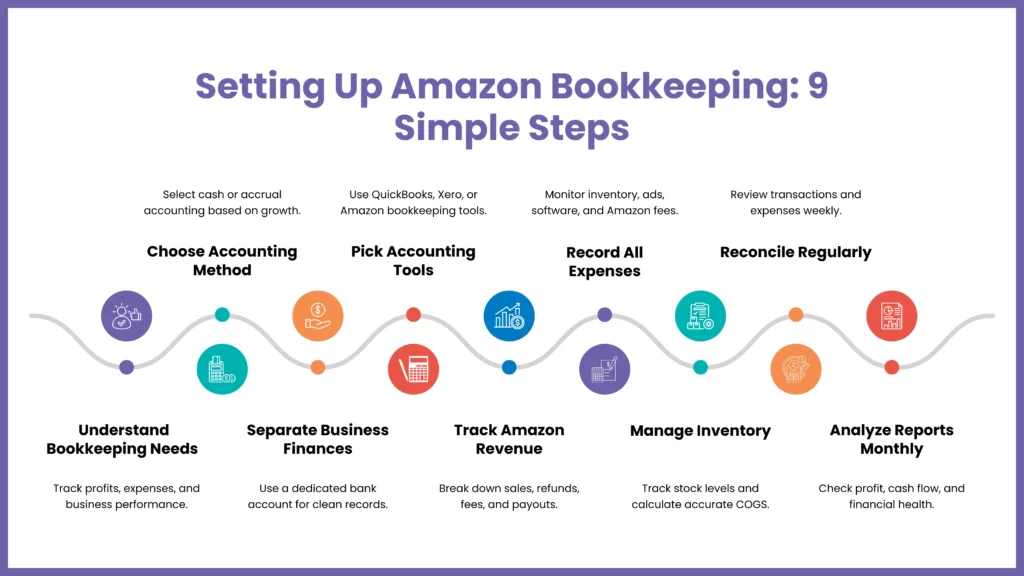
Start by understanding why it matters
This isn’t paperwork for its own sake, Amazon bookkeeping is the financial backbone of the business. It’s what tells you your real profitability, keeps you compliant, and replaces guesswork with actual data.
Pick an accounting method
Cash accounting records money when it actually moves. Accrual accounting records transactions when they happen, regardless of when the cash shows up. Most sellers start with cash and move to accrual as volume grows, since accrual tends to give a truer picture once things get complex.
Open a separate business bank account
This one’s non-negotiable. Mixing personal and business funds makes reconciliation a nightmare and can cause real headaches if the IRS ever comes asking questions.
Choose your tools
Spreadsheets can work early on, but most sellers eventually move to software. QuickBooks Online, Xero, and Amazon-specific tools like A2X can automate a lot of the grunt work and scale as the business grows.
Track income properly
Amazon pays out net of fees, so you need to break each Settlement Report down into gross sales, refunds, fees, and the final deposit amount. Honestly, this is the part of Amazon Seller bookkeeping that trips up the most people, it’s easy to just look at the deposit and assume that’s “revenue,” which it isn’t.
Log every expense.
Inventory, ad spend, software subscriptions, Amazon fees, packaging — all of it. Thorough expense records matter both for tax deductions and for surviving an audit if one ever happens.
Stay on top of inventory
Cost of Goods Sold is tied directly to inventory data, so know what you’ve bought, what’s sold, and what’s sitting in stock, particularly with FBA, where units can be scattered across multiple warehouses at once.
Build a routine and stick to it
Weekly or biweekly, sit down and reconcile transactions, check expenses, and confirm inventory counts. Skip this for a month and it turns into a much bigger job later.
Review your reports monthly
Profit and loss, balance sheet, cash flow, look at all three every month. They’ll tell you where the business is doing well and where it’s quietly bleeding money.
Common Amazon Bookkeeping Mistakes (and How Sellers Get Past Them)
Even seasoned sellers fall into a few of these Amazon bookkeeping traps. Here’s what to watch for.
Recording transactions inconsistently
When entries get logged sporadically instead of on a schedule, your books start drifting from reality, mismatched reconciliations, wrong profit numbers, cash flow surprises. This is especially common among sellers still doing everything by hand. The fix is usually less about willpower and more about automation: let accounting software capture transactions as they happen, set a recurring time to review them, and make sure one person actually owns the task instead of it falling through the cracks.
Mixing up income and expense categories
Filing a capital expense as a regular operating cost (or the other way around) throws off your financial statements and can mess with your tax return. It happens most often to sellers without an accounting background, which is understandable, the categories aren’t always intuitive. Learning the basics helps, as does relying on the built-in categories most software already provides rather than inventing your own. A periodic review from a bookkeeper catches what slips through.
Losing receipts and invoices
Documentation matters most exactly when you don’t have it, during an audit or a tax dispute. Small purchases are the usual culprits; nobody keeps the receipt for a $12 packaging order. Scanning receipts immediately, organizing them by vendor or date, and setting aside a few minutes each week to file stragglers solves most of this.
Blending personal and business money
This is probably the single most common mistake among solo sellers. One personal purchase on the business card, one business expense paid out of pocket, and suddenly reconciliation is a mess and tax calculations get murky. Separate accounts fix most of it. Software that auto-tags transactions by account helps too, and it’s worth setting a hard rule for yourself about what does and doesn’t go through the business account.
Skipping bank reconciliation
A surprising number of sellers treat this as optional. It isn’t — skip it long enough and you might not notice a fraudulent charge or a bank error for months. Reconcile monthly, no exceptions, and use software with built-in reconciliation tools that flag mismatches automatically.
Amazon Bookkeeping Software Worth Knowing About
Software won’t fix bad habits on its own, but paired with a consistent process, it removes most of the manual grind from Amazon bookkeeping. If you’d rather have specialists set this up correctly from day one, working with experienced ecommerce accountants is often faster than trying to configure everything solo.
A few tools worth looking at:
- QuickBooks Online — widely used, strong for expense automation and syncing Amazon sales data.
- Xero — clean bank reconciliation, good third-party integrations built for Amazon sellers.
- A2X Accounting — built specifically for marketplace sellers, and genuinely good at breaking settlement payouts into clean journal entries.
- Wave Accounting — a solid, budget-friendly pick for sellers just starting out.
- Zoho Books — a good fit for multi-channel sellers juggling invoicing, payments, and reporting across platforms.
When It’s Time to Hire Amazon Bookkeeping Services
At some point, DIY bookkeeping stops keeping pace with the business. Settlement reports get more complicated, SKU counts climb, and sales tax obligations start stacking up across states. That’s usually the point where sellers start looking into professional Amazon Bookkeeping Services instead of muscling through it alone.
Bookkeepers who specialize in ecommerce understand FBA fee structures, multi-state sales tax reporting, and inventory-driven COGS in a way general bookkeepers often just don’t. Bringing in someone who focuses on bookkeeping for Amazon sellers usually means settlement reports get reconciled properly every cycle, sales tax stays organized even across dozens of states, monthly reports are ready well before tax deadlines, and you get your time back to focus on sourcing and growth instead of spreadsheets. Firms offering dedicated bookkeeping services for online sellers can usually plug straight into your existing setup without much disruption.
If handling this alone isn’t realistic anymore, working with a firm that specializes in Amazon Bookkeeping Services tends to pay for itself, in hours saved, and in mistakes that never happen in the first place.
People Also Ask:
What is Amazon bookkeeping?
Amazon bookkeeping is the process of tracking and organizing all financial transactions tied to an Amazon store, sales, refunds, FBA fees, advertising spend, and inventory costs, so sellers know their true profitability and stay compliant with IRS and state tax requirements.
How is Amazon bookkeeping different from regular ecommerce bookkeeping?
Amazon bookkeeping involves more complex fee structures (referral fees, FBA fulfillment fees, storage fees), bundled settlement reports instead of clean order-by-order payouts, and biweekly payout cycles that require careful cash flow tracking, none of which apply the same way to platforms like Shopify or Etsy.
Do I need a separate bookkeeper for my Amazon business?
Not necessarily at the start, but as sales volume, SKU count, and state sales tax obligations grow, most sellers find that professional Amazon Bookkeeping Services save more in errors and time than they cost, especially once settlement reports and multi-state tax reporting get complicated.
What software is best for Amazon Seller bookkeeping?
QuickBooks Online, Xero, and A2X Accounting are among the most widely used. A2X in particular is built specifically for marketplace sellers and automatically breaks down Amazon settlement reports into clean, accurate journal entries.
Does Amazon collect sales tax for sellers automatically?
In most states, yes – Amazon collects and remits sales tax on a seller’s behalf under marketplace facilitator laws. However, sellers are still responsible for keeping accurate records, reconciling what was collected, and reporting correctly at tax time.
Not sure whether to DIY your books or bring in help? Our team can review your current setup and show you exactly where you’re losing time or money.
Conclusion
Good Amazon bookkeeping is the thing every successful Amazon business is quietly built on, even if nobody talks about it much. It’s not glamorous, but it’s what lets you understand your cash flow, keep inventory costs in check, walk into tax season without dread, and make decisions based on actual numbers instead of gut feeling.
Whether you build the system yourself with the right software or hand it off to dedicated Amazon Bookkeeping Services, the sellers who treat their books as a real priority, not something to deal with later, are usually the ones still scaling three years from now. Get the bookkeeping right, and pretty much everything else about running the store gets a little easier.
Tired of chasing settlement reports and guessing at your real profit margins?
Let our ecommerce accounting specialists handle your Amazon bookkeeping, accurate, IRS-ready, and built around how FBA actually works. Get a free bookkeeping consultation
